


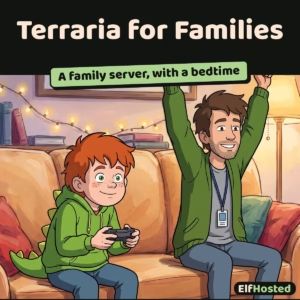
Terraria for Families
$9.00 / month
Free trial: 7 days
Sign-up fee: $1.00
A Terraria server built for families, by parents who run one at home. Always on for the kids, with a panel that shows you who is playing, how long they have played, and closes the world at bedtime.
A Terraria server with a bedtime. It closes the world at nine, tells you who has been playing and for how long, and warns them in the game before it shuts. Then, underneath all that, it is an always on TShock server with the griefing tools you would want.
Your kids want a world that is still there tomorrow. You want to know who is on it, how long they have been playing, and to have it close itself at nine o’clock without you being the one who says so. Most Terraria hosting solves the first half. This solves both.
The parental controls, at a glance
- Who is on, right now. Names, and how long each of them has been playing this session.
- How long they have played today. Per child, today and across the past week, on the first screen rather than buried.
- A daily allowance for each child. Set how long each of them can play on weekdays and at weekends, with a warning in the game five minutes before it runs out.
- A bedtime that closes the world on its own. Different hours for school nights and weekends, with warnings in the game before it shuts.
- Who is allowed in. A list you control, and nobody else gets in.
- A push notification when they join or leave. On your phone, at a glance, with nothing to install.
- No chat reading. Deliberately. See below.
All of it included, on every server, with no separate tier.
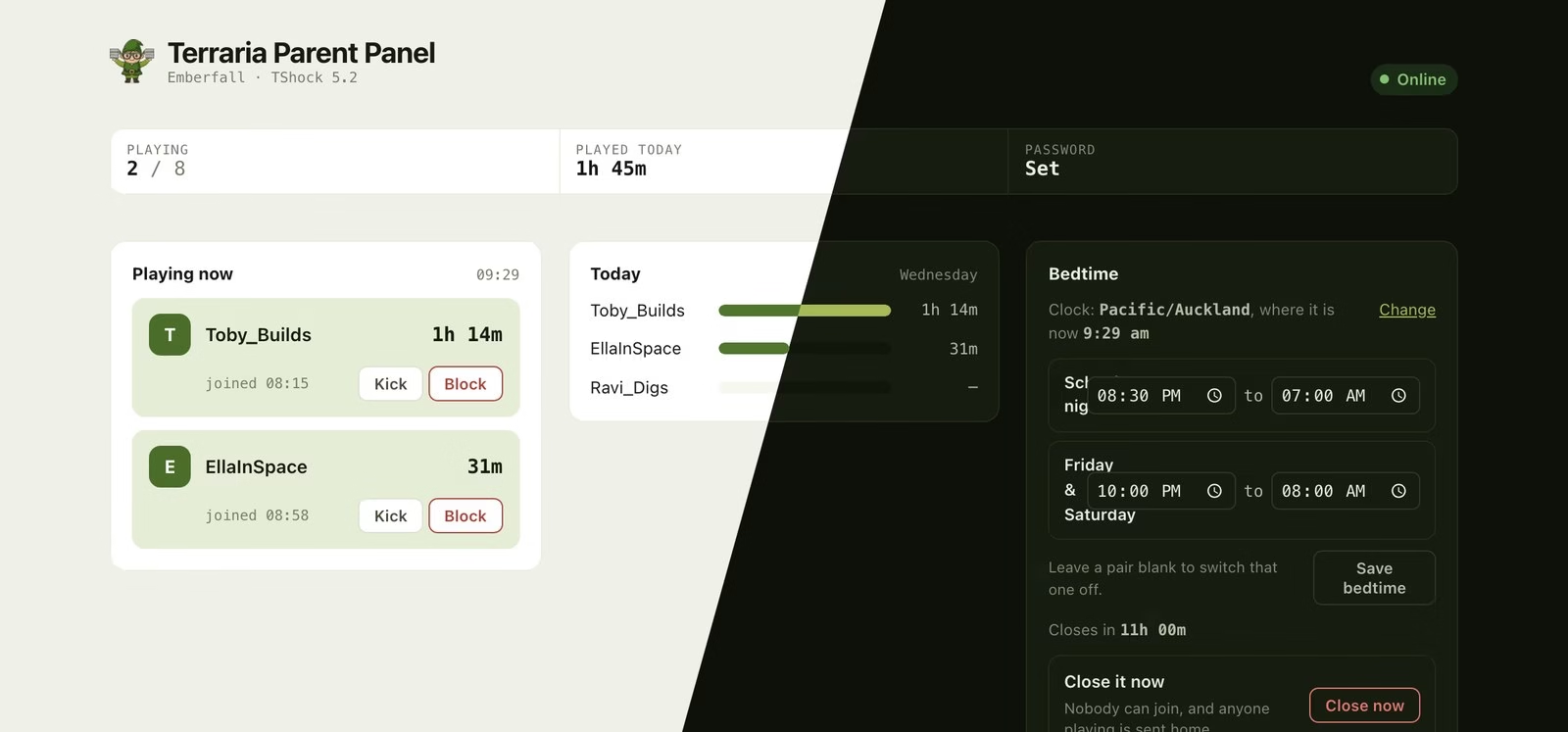
Can I see who is playing, and for how long?
Every server comes with a private web panel, signed in with your ElfHosted account. Your kids cannot reach it, and they do not need to.
- Who is playing, right now. Names, and how long each of them has been on this session.
- How long they have played. Today, and across the past week, per player.
- Bedtime. Set the hours the world is closed, with different hours for school nights and weekends. Nobody can join while it is closed, and anyone still playing gets a warning in the game ten minutes and one minute before it shuts.
- A late pass. Open it past bedtime for one night and tomorrow’s bedtime still happens, so one exception does not quietly switch the whole thing off.
- Tell me when they join. Add ElfHosted to your phone’s home screen and alerts arrive there, with nothing to set up. Send them to a family Discord, Telegram, ntfy or an email address as well if you want the other parent to get them too.
- Kick, and block a name. For when asking twice has not worked.
- An invitation to copy and paste. Address, port and password in one block, ready to send to another parent, with the two clicks their child needs in Terraria.
Will I know when they join?
Yes, and this is the feature parents end up leaning on most. Add ElfHosted to your phone’s home screen and a push notification arrives the moment somebody joins or leaves. No app to install, nothing to configure, and it works on the phone you already have in your pocket.
One glance at the lock screen tells you who is on. You do not need to open anything, and you do not need to ask.
If you would rather they went elsewhere as well, send them to a family Discord, Telegram, ntfy, Pushover or an email address, which is the usual way to get them to the other parent or to a phone that never installed anything.
Alerts can be muted on their own if they get chatty, without losing anything else.
What do I not have to deal with?
- Always on. The world is there at 2am, mid-week, and while everyone is at school. No PC left running, no “we can only play when Dad is home”.
- Nothing opened on your home network. No port forwarding, no router configuration, nothing exposed at your house.
- A fixed address. Friends save it once. Point your own domain at it with a single DNS record if you would rather.
- Backed up. Worlds live on the same backed-up storage as the rest of your apps, not on somebody’s desktop.
- Its own password, generated for you. Three words you can read down a hallway, not a shared default every other server on the internet also uses. Change it to whatever you like in the panel.
- Griefing tools. Region protection, player accounts and permissions, and bans, courtesy of TShock.
How do I set a bedtime on a Terraria server?
Open your panel, choose Bedtime, and set the hours the world is closed. School nights and Friday and Saturday get their own hours, so the weekend can be later without you rewriting anything.
Anyone still playing is warned in the game ten minutes before, and again at one minute. Then the world closes to everybody at once, rather than singling one child out. Their builds are exactly as they were.
Bedtime runs on your own timezone, which you pick in the panel the first time you open it. The panel shows the zone it is using and the current time in it, so a nine o’clock bedtime happens at nine o’clock.
Can I limit how long they play each day?
Yes. Give each child a daily allowance, one amount for weekdays and another for the weekend, or set one for the whole household and adjust it for anyone who needs more or less. They get a warning in the game five minutes before it runs out, and then the server sends them home for the day. Rejoining does not reset it.
A special day? Add extra time for today from the panel, and tomorrow the usual allowance applies again. Allowances reset at midnight in your timezone, and bedtime still closes the world for everyone, whatever time is left.
The allowance follows the character name, which players type in themselves, so a child who renames starts a fresh one. It is a nudge for a household that plays along, not a lock.
Who built this?
ElfHosted is a small team, and the people who built this run it for their own kids. Bedtime exists because somebody needed it on a Tuesday. The warning ten minutes before the world closes exists because being kicked mid boss fight starts an argument. When you ask for help, you are talking to someone who has had the same conversation at their own dinner table.
What does “safer” actually mean here?
- Nothing is opened on your home network. The usual way to run Terraria for kids is a PC at home with a port forwarded through the router, which points the internet at your house. This does not.
- Your server has its own password. Generated when it is built, unique to you, three words you can read down a hallway. Not a shared default that every other server on the same host is also using.
- The panel is yours alone. It sits behind your ElfHosted account. The kids cannot open it, and nor can their friends.
- Alerts you can tune. Mute game notifications on their own if they get chatty, without losing the ones that matter more.
- You can close the door. On a schedule, or right now, from your phone.
What it is not: we do not read chat, moderate players, or vet who joins. You decide who gets the password. What we give you is the ability to see who is on, and to close it.
Frequently asked questions
Do the kids need to install anything?
No. TShock runs on the server, so everyone joins with an ordinary, unmodified Terraria client on whatever they already play on.
Can I see what they are building, or read their chat?
No, and that is deliberate. The panel shows you who is on and for how long, and lets you close the server. It is a way to run the household rule you already have, not a way to watch over their shoulder.
What if they change their character name?
Terraria lets players type in their own character name and nothing checks it, so somebody playing under a new name shows up in the panel as a new person. The playtime log is an honest record of a cooperative household, not evidence. Bedtime is unaffected: it closes the whole server, whatever anyone is called.
Can they just go and play somewhere else at bedtime?
Of course. This closes your world, not the internet. What it does is take you out of the argument: the server is shut, and it was shut before anyone asked.
Is this modded Terraria?
No. This is the dedicated server, not tModLoader, which is a different program.
How long until we can play?
Your world is generated the first time the server starts, which takes a few minutes for a large one. After that, restarts take seconds.
Can I change the bedtime once it is set?
Any time, from the panel, and it takes effect immediately. You can also open the world for one night without touching the schedule: tomorrow’s bedtime still happens.
Can my child play on a tablet or a console?
Terraria’s dedicated server takes the ordinary desktop client. Mobile and console editions of Terraria do not join a dedicated server like this one, so this is for the PC crowd. If your household is on consoles and tablets, our Minecraft server is the one that handles them.
What does it cost?
Nine US dollars a month, billed monthly, cancel whenever you like. The panel and its parental controls are included rather than being a separate tier.
Only logged in customers who have purchased this product may leave a review.

Reviews
Clear filtersThere are no reviews yet.