





Homepage
From $1.29 / app / month
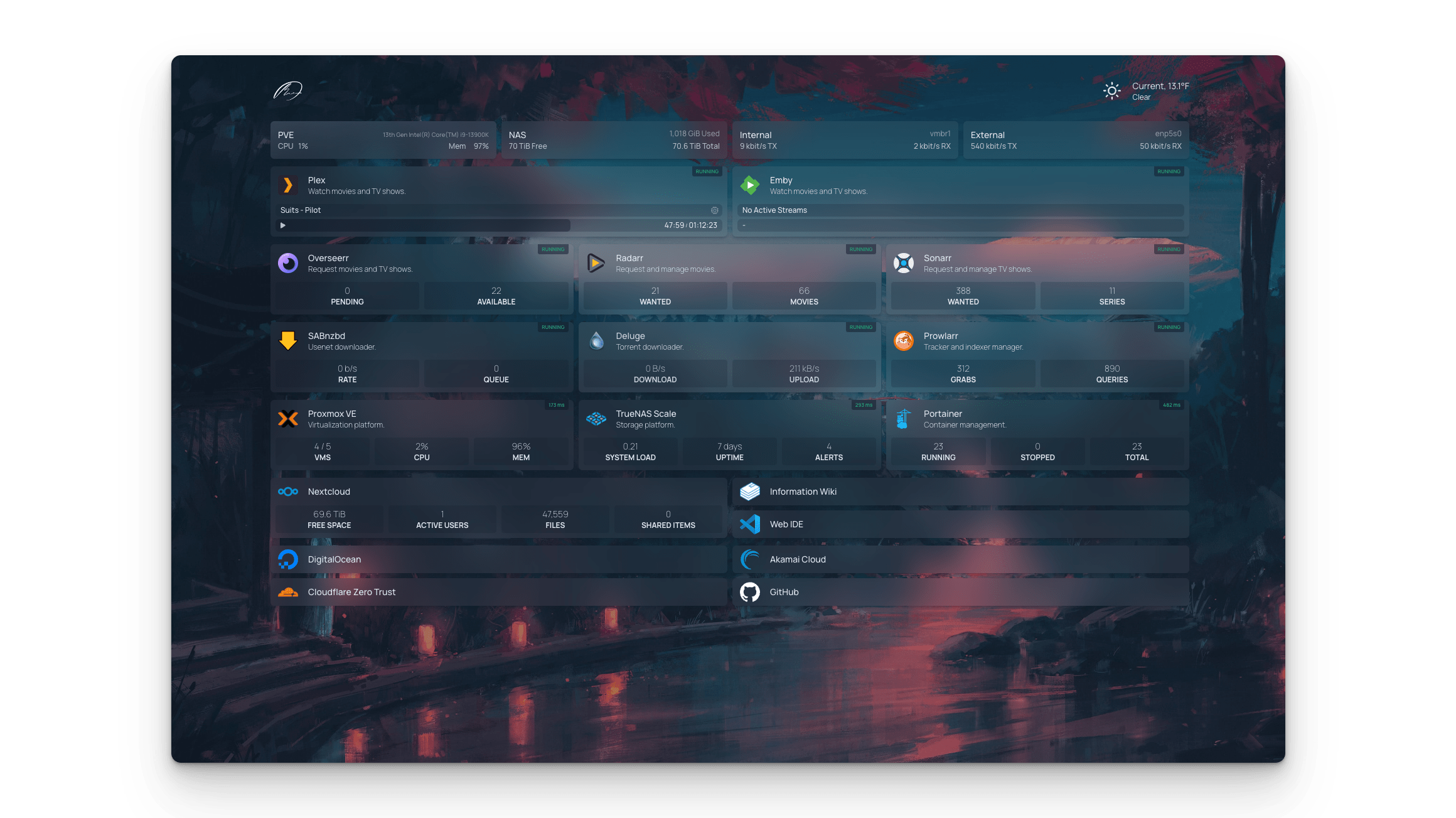
Self-hosted application dashboard with live status widgets for 100+ self-host apps — the YAML-configured “one tab to rule them all” startpage that’s become the de-facto standard.
A managed instance of Homepage on ElfHosted (the 30K-star gethomepage/homepage, not to be confused with older similarly-named projects). Custom dashboard with live widgets for Plex, Jellyfin, the *arr stack, Docker, Kubernetes, Home Assistant, and 100+ more services. Configured in YAML, blazingly fast, no database. GPL-3.
Included in every Flex plan. The from price is Flex Pro paid yearly, running 18 apps at once. Flex starts at $9.00 a month for 4 apps.
The browser tab you open first thing every morning. Status of everything in your self-host stack at a glance, plus bookmarks, plus weather, plus whatever else fits your morning ritual.
What is Homepage?
Homepage (the gethomepage one — there are several similarly-named projects) is a self-hosted application dashboard. Configure your stack in YAML; Homepage renders a clean grid of service tiles, each pulling live status from the underlying service's API. Plex shows currently-streaming sessions, Sonarr shows the queue depth, Uptime Kuma shows incident count, Docker shows container counts — at a glance, in one tab, refreshed live.
Most self-hosters end up here within a year of starting because the alternative ("a bookmarks folder with 40 entries") doesn't scale. Homepage is the consensus answer; Heimdall and Organizr are the older alternatives still in use, but Homepage has the active development, the modern stack, and the largest widget catalogue.
Features
- 📊 Live widgets for 100+ self-host apps — Plex, Jellyfin, Emby, Sonarr, Radarr, Prowlarr, Bazarr, Lidarr, Readarr, Tautulli, Overseerr, Jellyseerr, Komga, Audiobookshelf, qBittorrent, Sabnzbd, NzbGet, Deluge, Transmission, Pi-hole, AdGuard, Home Assistant, Docker, Kubernetes, Proxmox, Truenas, Synology, Unifi, OPNSense, Nginx Proxy Manager, Traefik, Authelia, Authentik, Vaultwarden, Bitwarden, Uptime Kuma, Healthchecks, Glances, Speedtest Tracker, plus dozens more.
- 📝 YAML-configured — `services.yaml`, `bookmarks.yaml`, `widgets.yaml`, `settings.yaml`. Version-controllable; portable; no database to back up.
- 🌗 Themes & layouts — light/dark/auto themes, custom colour palettes, multi-column layouts, group/category organisation.
- 🔍 Built-in search bar — search Google / DuckDuckGo / Brave / Kagi / your-search-engine-of-choice from the dashboard.
- 🔖 Bookmarks & quick links — alongside service tiles, organise bookmarks (docs, third-party tools, frequently-visited URLs).
- 📅 Info widgets — weather, calendar, RSS feed, Glances system stats, custom HTML.
- 🐳 Docker label discovery — Homepage can auto-discover Docker containers via labels; new container with the right labels appears on the dashboard automatically.
- 🔐 SSO-ready — sits cleanly behind Authelia / Authentik / ElfHosted SSO; per-tile auth proxying for protected services.
- 📱 Mobile-responsive — same dashboard works on phone-sized screens.
- 🔓 FOSS & GPL-3 licensed — no premium tier, no telemetry.
Homepage vs Other Self-Host Dashboards
- vs. Heimdall — Heimdall is the older self-host dashboard; clean UI, click-tile to launch. Homepage adds live status widgets that Heimdall doesn't have. Heimdall remains a valid choice for "I just want a clickable launcher"; Homepage is the right pick for "I want to see status without clicking through".
- vs. Organizr — Organizr is the third long-running player; deeper integration with the *arr stack via embedded iframes (load Sonarr inside the Organizr UI). More opinionated; heavier; Homepage is the lighter / faster / more flexible alternative.
- vs. Dashy / Flame / Hubble — newer YAML-configured dashboards. Dashy in particular has a similar vibe; Homepage has won on widget-catalogue breadth and active development. Check both if you want to compare.
- vs. browser bookmarks folder — bookmarks are fine until you have more than 20. Past that, a dashboard with categories + status is what you want.
- vs. a custom-coded dashboard — many self-hosters have built one. They're maintenance burden you shouldn't take on; Homepage is the off-the-shelf answer.
Why Run Homepage on ElfHosted?
Homepage is small (Next.js app, no database) and easy to self-host, but the integration story matters:
- Pre-wired to talk to your other ElfHosted apps — point a widget at your Sonarr [Exposed!], Radarr [Exposed!], Prowlarr, Uptime Kuma, etc., and live status appears immediately. The internal hostnames are reachable from the dashboard tier.
- HTTPS with auto-renewing TLS — required for the dashboard to call most modern self-host APIs (which themselves require HTTPS).
- Persistent YAML storage — your `services.yaml` and friends survive restarts; backed up nightly.
- Updates handled — Homepage ships releases roughly every two weeks.
- Single subscription: $9/month all-in.
Technical Specifications
- 🛠️ Software: Homepage (FOSS, GPL-3)
- 📋 Configuration: YAML files (`services.yaml`, `bookmarks.yaml`, `widgets.yaml`, `settings.yaml`, `kubernetes.yaml`, `docker.yaml`)
- 📊 Widget catalogue: 100+ self-host service integrations + system info widgets (weather, calendar, RSS, Glances) + container/orchestration widgets (Docker, Kubernetes)
- 🐳 Auto-discovery: Docker containers via labels; Kubernetes services via annotations
- 🔍 Search: Google / DuckDuckGo / Brave / Kagi / Bing / Startpage / Searx / Whoogle / Ecosia / Qwant / custom
- 🌗 Themes: light / dark / auto, custom colour palettes
- 📱 Mobile: responsive web UI
- 🔑 Subscription: $9/month — Homepage itself is fully free
- 🌐 Access: HTTPS on your own ElfHosted subdomain
- 🔄 Updates: handled by ElfHosted
Frequently Asked Questions
How do I run Homepage without self-hosting it?
Add it to your ElfHosted subscription — managed Homepage instance with HTTPS, persistent YAML storage, automatic updates, and pre-wired connectivity to your other ElfHosted apps. Edit your `services.yaml` in the web UI or via the included file manager.
Can it talk to my other ElfHosted apps?
Yes — that's a major reason to host Homepage on the same tier as your other apps. Internal service-to-service calls work; you don't need to expose every app's API to the public internet just so the dashboard can show its status. Just configure the widget with the internal hostname.
What about apps I host elsewhere (home lab, separate VPS)?
Those work too — point widgets at any reachable HTTPS endpoint. Common pattern: ElfHosted-hosted Homepage as the "always-on dashboard" pulling status from both ElfHosted apps and your home-lab apps via Tailscale / Cloudflare Tunnel / direct HTTPS.
Is the configuration version-controllable?
Yes — that's the whole appeal of YAML over a database-backed config. Keep your `services.yaml` and friends in a git repo; mirror to ElfHosted via the web UI or file manager. Many users version-control the whole config and treat the dashboard as code.
How does this compare to Dashy?
Same shape (YAML-configured self-host dashboard) but Homepage has won on widget-catalogue breadth and active development pace. Dashy is still good; if you're starting from scratch, Homepage is the safer bet.
Can multiple users see different views?
Homepage is single-config (one YAML set) but supports multiple groups / categories that can be hidden behind auth proxying. For genuinely separate per-user dashboards, you'd run multiple Homepage instances — but most households share one.
Is there a mobile app?
No native app needed — the responsive web UI works on phones. Some users add the dashboard URL to their phone home screen via PWA install for app-like behaviour.
Homepage is the YAML-configured, widget-rich dashboard that's become the consensus answer for self-host stacks. 100+ live status integrations, mobile-responsive, version-controllable. Hosted on ElfHosted with HTTPS, persistent storage, and pre-wired connectivity to your other apps for $9/month.
Only logged in customers who have purchased this product may leave a review.
Related products

Uptime Kuma
Self-hosted uptime monitoring with public status pages — the open-source UptimeRobot alternative that doesn't cap your monitor count or charge for SSL alerts.
A managed instance of Uptime Kuma on ElfHosted — the 86K-star self-hosted monitoring tool. HTTP / TCP / ping / DNS / keyword / push monitors, public status pages with custom domains, 90+ notification channels (Discord, Slack, Telegram, email, ntfy, Pushover, Apprise, etc.), multi-user, 2FA. MIT-licensed; no monitor caps, no premium tier.

Gotify
Self-hosted push notification server — your *arr stack, Uptime Kuma, Watchtower, and any webhook-capable tool fan out alerts to one Android app on your phone.
A managed instance of Gotify on ElfHosted — the self-hosted push notification server with native Android app, simple REST API, and broad ecosystem support. Most self-host tools (Uptime Kuma, the *arr stack, Watchtower, Home Assistant) speak Gotify out of the box. BSD-3 licensed; lightweight Go binary; works without a Google or Apple push-vendor account.


Beaver Habit Tracker
Self-hosted habit tracking, minus the "Goals" gamification — just check the box, build the streak, own your data.
A managed instance of Beaver Habit Tracker on ElfHosted — a deliberately minimal habit tracker with no goal-setting wizardry, no upsell screens, and no analytics shipped to anyone but you. Tick habits off daily, watch streaks build, install as a PWA on iOS/Android. AGPL-3.0, your data stays in your storage.




FlatNotes
Self-hosted markdown notes that live on disk as plain .md files — no SQL database, no proprietary export, your notes survive every app you'll ever stop using.
A managed instance of FlatNotes on ElfHosted — a deliberately minimal markdown notes server where every note is a flat .md file. Edit in the web UI, or sync the notes folder with Syncthing/rclone and edit in Obsidian / VS Code / vim. Full-text search, tags via #hashtags inside notes, dark mode. MIT-licensed.
Reviews
Clear filtersThere are no reviews yet.